
Create listings “automagically.”
Listing Magic™ uses AI and Acenda’s structured data model to build marketplace-ready listings for every channel you sell on — then watches those listings and fixes channel errors as they appear. One product record in. Correct listings out, everywhere.
Available to Acenda clients at no additional charge during beta.
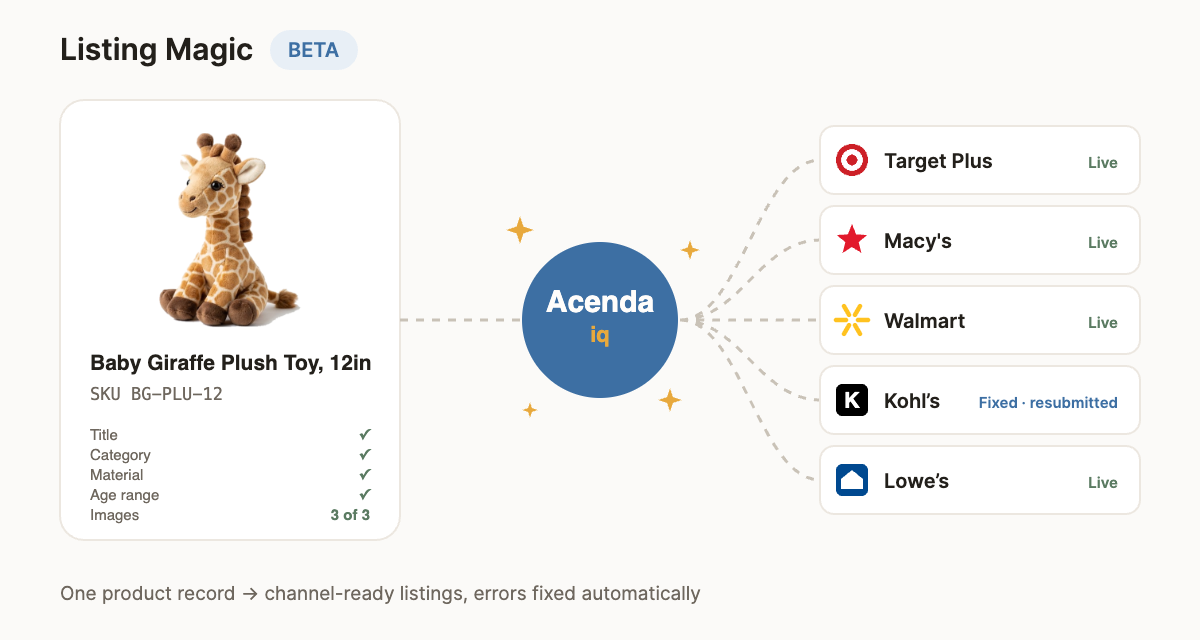
Every marketplace wants your product described its way
The same product needs a different category, a different set of required attributes, different picklist values and different image rules on every channel. Teams end up maintaining one spreadsheet per marketplace, chasing rejections one SKU at a time, and never quite knowing which listings are actually live.
Listing Magic starts from the structured product data already in Acenda and does the translation for you — then keeps doing it as marketplaces change their rules.
How it works
Start from one record
Your master product in Acenda: identifiers, variants, attributes, images. No per-channel copies.
AI maps it to each channel
Acenda IQ reads each marketplace’s live schema and proposes the category, required attributes and picklist values — filling gaps from your own content.
You approve, it publishes
Review proposed values in one worklist, approve, and listings go out to every connected channel at once.
Errors get fixed, not filed
Rejections come back per SKU and field. Acenda IQ proposes the fix and resubmits — automatically at 90%+ confidence if you turn on Auto-accept.
What Listing Magic does
Built with guardrails
AI proposes; your team decides. Material composition, country of origin, identifiers and compliance claims are never inferred from images or guessed — if the source data doesn’t say it, Listing Magic asks. Auto-accept is off by default, applies only above the confidence threshold you set, and keeps a full log of every change so anything can be reviewed or reverted.
Frequently asked questions
What is Listing Magic™?
An Acenda IQ feature that uses AI and Acenda’s structured product data model to create marketplace-ready listings across multiple channels at once, then monitors those listings and fixes channel errors as they appear.
Which marketplaces does it support?
Any channel connected to your Acenda account. Each marketplace has its own category schema, required attributes and image rules; Listing Magic maps your master product record to each one.
Does the AI publish without a human?
By default, no. The AI proposes attribute values and error fixes; your team reviews and approves them in Acenda. The optional Auto-accept setting applies a fix automatically only when the AI’s confidence is 90% or higher, and you can turn it off at any time.
What happens when a marketplace rejects a listing?
Acenda IQ reads the channel’s rejection, identifies the exact SKU and field, proposes a correction, and resubmits once approved (or automatically, if Auto-accept is on). Every fix is logged.
Is it available now?
Listing Magic is in beta and available to Acenda clients at no additional charge. Email support@acenda.com to have it enabled on your account.
Does it replace my PIM or catalog?
No. Your master product record stays where it is. Listing Magic works from the structured data already in Acenda and writes channel-specific listings on top of it.
Stop fixing listings one SKU at a time.
Listing Magic™ is in beta for Acenda clients at no additional charge. Email support and we’ll switch it on.